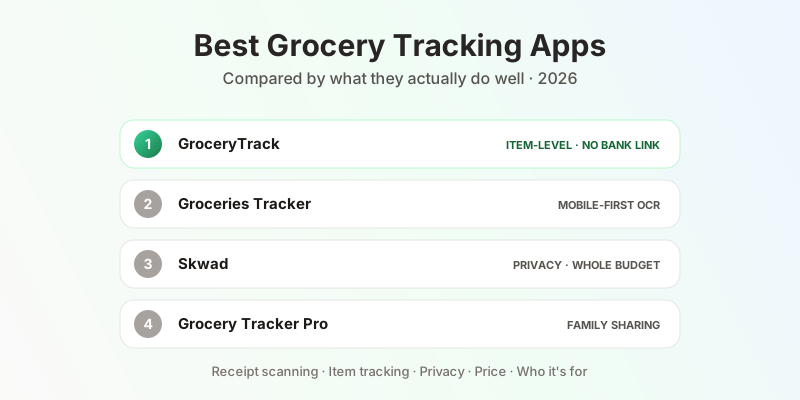
Best Grocery Tracking Apps in 2026
Groceries are one of the most variable line items in a household budget — and one of the hardest to track. Your bank statement tells you you spent $94 at Trader Joe's on Tuesday. It doesn't tell you how much of that was produce, how much was meat, or whether you bought the same bag of chips three weeks in a row.
A dedicated grocery tracking app fills that gap. But the options range from lightweight list managers to full-scale budgeting suites, and most people searching for "grocery tracker" end up comparing tools that aren't actually trying to solve the same problem.
This post breaks down the best options in 2026 by what they actually do well — and who they're built for.
What to Look for in a Grocery Tracking App
Before comparing apps, it helps to clarify what you actually want. Most apps in this category do one of four different things:
Receipt scanning — you photograph a paper receipt or forward a digital one, and the app extracts items and prices automatically. Best for understanding what you actually bought, not just where you spent money.
Manual entry — you type in what you spent. Accurate, but high friction. Most people abandon manual tracking within two weeks.
Bank linking — the app connects to your bank or credit card and pulls in transaction data. Fast, but shows you store totals only, not individual items.
Grocery list management — the app helps you plan what to buy, but doesn't track what you actually spent. Useful for shopping, not for budgeting.
The best app for you depends on which of these problems you're solving. Here's how the leading options stack up.
Positioning
How the apps map by intent
Apps in the upper-left solve grocery in deep detail. Apps in the lower-right cover your whole budget but only see store totals. Skwad sits in the middle: a whole-budget tool with a receipt scanner bolted on.
GroceryTrack
Best for: Households that want item-level spending data without linking their bank account
Platform: Web (grocerytrack.food) · iOS (App Store) · Android (Google Play)
Price: Free (10 receipt scans/month) · Pro $3.99/month or $39.99/year (save 16%) · 30-day free trial of Pro on every new account, no credit card
GroceryTrack is built specifically around one idea: your grocery receipt contains more useful information than your bank statement, and you should be able to see all of it. The app uses Google Gemini AI to extract every item, price, and category from a receipt — paper or digital — and builds a running picture of your household grocery spending over time.
What it does:
- Native iPhone and Android apps (v1.9.0 on iOS, v1.8.1 on Android) — camera capture with auto-focus and a receipt boundary guide, fully offline scanning with automatic sync, a home-screen widget for month-to-date spending, weekly and monthly push summaries, Face ID lock, and full dark mode. Guided onboarding walks a new account from first scan to a working budget, and every scan ends in a two-step review: quick-check the store, total, and each line with its category, then read that trip's own category breakdown before you close. Pro subscribers can even pick the AI model tier that reads their receipts and the one that answers Ask. The app records no session replays. The Android app, public on Google Play since October 2026 after a five-month beta, is the same app: native camera capture, offline scanning with sync, the post-scan review, the Ask tab, the pantry, and receipts shared from Gmail, Files, or Chrome, in Material UI with full dark mode, and every new Android account starts with 90 days of Pro. One account syncs all three
- Ask your receipts — a dedicated Ask tab in the iOS and Android apps answers questions about your own shopping in plain language, read out of your receipt history: "what do I buy most often?", "when was my last trip to Whole Foods?", "how much did I spend on groceries last month?". Starter questions are offered up front so you are never staring at an empty box
- Snap paper receipts from any grocery store — the AI reads every line item, assigns categories (produce, dairy, meat, snacks, household, etc.), and logs it automatically
- Forward digital receipts by email — if you shop on Instacart, DoorDash Grocery, Amazon Fresh, or get emailed receipts, you forward them directly to GroceryTrack and the AI handles extraction the same way
- PDF, image, and link receipts — upload a PDF or an image on the web or from Files on iPhone, or use the share sheet to send a PDF, an image, or a link to an online receipt straight into the app, from Mail, Files, Messages, or Safari on iPhone and from Gmail, Files, or Chrome on Android. Each is read the same way a scan is, the original stays one tap away in the receipt detail, and if a receipt matches the store, date, and total of one you already have, the app says so and lets you keep both or delete the extra
- GrocerySnap for receipt-less purchases — add items manually when you don't have a receipt (farmers markets, small bodegas, split bills) so nothing falls out of your tracking
- Household sharing via multiple forwarding addresses — every household member can register their own forwarding email under the same account, so receipts from each shopper land in one shared dashboard
- Edit anything, right when you notice it — fix the name, price, quantity, or category on any line item, correct the store, date, or currency, re-run AI extraction on a receipt, or build one from scratch with no photo at all. On iOS those three most-often-wrong fields — store, date, currency — are reachable in the quick-check step straight after a scan, before a bad read has a chance to settle in, and the currency you pick is saved as your preference so an ambiguous “$” stops being misread on later receipts. Per-receipt currency support keeps travel and imported receipts honest
- Spending breakdown by category — see exactly how much of your grocery budget goes to produce vs. meat vs. packaged goods vs. household items each month
- Spending breakdown by store — compare your spend at different grocery stores over time
- Monthly budget trend chart — how this month stacks up against previous months, broken down by category so you can see which line items are drifting
- Search across your full purchase history — find any past item or receipt in seconds, useful for price memory and warranty lookups
- Storage-aware freshness countdown — GroceryTrack shows a per-item countdown so you know what to eat first, and the estimate depends on where you actually keep the thing: the same carton reads differently in the pantry, the fridge, and the freezer, and moving it mid-life recounts from that day. Any estimate can be overridden with your own best-by date, with quick picks from one week to three months. Buy the same item on two trips and it shows as two rows, each with its own countdown, oldest first
- A pantry window you choose — decide how far back the Pantry looks (one week, four weeks, three months, or everything you've ever bought), with an on-screen filter chip for a quick peek at a different range without changing the setting
- Pantry with recipe and shopping list ideas — the Pantry view shows what you likely still have in stock based on recent receipts, then uses that to suggest recipes you can make right now and a smart shopping list of frequently bought items due for repurchase. Mark items as eaten or trashed to close the loop between buying and using food, or track what's actually left — count down a multi-pack (“2 of 6 left”) or portion-track a single item as Full, ½, or ¼ — and anything running low feeds straight into the shopping list. On iOS you can send that list to Apple Reminders, and fix an item's name or quantity without leaving the Pantry. It's the practical engine behind reverse meal planning
- Organic cost estimator — a unique feature that calculates what your current grocery mix would cost if you switched to all-organic, based on your actual purchase history. Shows the real dollar difference between your current spend and a fully organic cart
- Nutrition insights — on the web, look up nutrition facts for 20+ everyday staples without bouncing to a third-party site. (The iOS app's Nutrition tab was retired in v1.7.0; Ask takes its place)
- Grocery Year heatmap — a twelve-month calendar shaded by how heavily you shopped each day, so a busy stretch or a quiet one is obvious at a glance. On the web dashboard, and as of v1.6.0 in the iOS app too (Pro)
- Grocery trip notes — jot down quality calls, price comparisons, and packaging quirks on any receipt. Notes resurface the next time you shop that store, and a one-click AI summary distills multiple trips into 3–5 takeaways about quality, price, and recurring patterns
- Weekly and monthly email summaries — a concise recap of your spending, top categories, and items you haven't used yet, delivered automatically so you don't have to open the app to stay informed
- Bring your groceries to any AI assistant — GroceryTrack ships an MCP (Model Context Protocol) server, so you can connect your data to Claude, ChatGPT, or any MCP-compatible client via OAuth 2.1 and ask questions like "what did I buy last week?" or "summarize my trip notes at Trader Joe's" right from your assistant. On iPhone the connect sheets live under Profile, with the connector name and server URL ready to copy
- Get your data out — on iPhone, send a shopping list to Apple Reminders, block out your grocery day in Calendar as a repeating event on the weekday you actually shop, and export every receipt as a CSV (Pro), one row per line item
What it doesn't do:
- No bank or credit card linking (by design — item-level data from receipts is more detailed than bank transaction data)
- No budgeting envelope system
The honest case for GroceryTrack: If you want to understand your grocery spending at the item level — which categories cost the most, whether organic is actually expensive in your specific cart, how your spending shifts by store — this is the tool built for exactly that. The $3.99/month Pro plan is among the lowest-priced options in this space, subscribable on the web or right inside the iOS or Android app, and the referral program gives you and a friend a free month of Pro each. The free tier (10 scans/month) covers most households shopping 1–2 times per week.
The honest limitation: It doesn't replace a general budgeting app. It doesn't know about your rent or utilities. It's a grocery-specific tool, not a whole-finance tool.
Groceries Tracker
Best for: Households that want AI receipt scanning plus store price comparison across mobile and web
Platform: iOS · Android · Web
Price: Free tier available · Subscription pricing varies
Groceries Tracker (groceriestracker.com) is the closest direct competitor to GroceryTrack in terms of feature focus. It also centers on AI-powered receipt scanning with item-level extraction — breaking down what you bought, what you paid, and which category it falls into.
Standout features:
- AI OCR receipt scanning with automatic item and price extraction
- Spending trends by category and by store
- Store price comparison — track what different items cost at different stores over time
- Household sharing — multiple people can scan receipts into the same dashboard
- Home screen widget for quick spending overview
- Available on iOS, Android, and the web
Key difference from GroceryTrack: The two apps overlap heavily on the basics — both scan receipts, extract items, and break spending down by category and store, and both offer web and mobile access. Groceries Tracker leans more into store price comparison and ships household sharing today. GroceryTrack leans more into category-level spending analysis, freshness countdown and the Pantry view for reverse meal planning, the organic cost estimator, email-forwarding for digital receipts, per-receipt trip notes with AI summarization, and a first-party MCP server that lets Claude or ChatGPT query your grocery history directly.
Skwad
Best for: Privacy-focused budgeters who want full household finances without linking their bank
Platform: iOS · Android
Price: 14-day free trial · $49/year (DIY) · $65/year (Link plan)
Skwad is a full-household budgeting app built around a single differentiator: you don't have to connect it to your bank. Instead of linking accounts, the DIY plan reads transaction notifications your bank sends by email or push notification and categorizes them automatically — no Plaid, no account credentials. (Skwad does also offer a separate Link plan with optional Plaid bank linking for users who want it.)
It does have a receipt scanner (with AI line-item extraction), but receipt scanning is one feature among many in a broader budgeting system. Skwad is an envelope budgeting tool that happens to scan receipts, not a receipt scanner that happens to show you budgets.
Standout features:
- No bank account linking required
- Email alert processing for automatic transaction capture
- AI receipt scanner with line-item extraction
- Envelope budgeting system
- Google Sheets sync and CSV export
- Household sharing (two profiles included in base plan)
Key difference from GroceryTrack: Skwad covers your whole financial picture — groceries, rent, utilities, dining out, everything. GroceryTrack is grocery-specific. If you want one app to manage all household spending without sharing bank credentials, Skwad is the strongest option in that niche. If you want deep grocery-specific analytics (category breakdowns, organic estimator, store comparisons), GroceryTrack goes further on that specific problem.
Worth noting: Skwad has strong Canadian market coverage, with dedicated integrations for Canadian banks (CIBC, Desjardins, PC Financial, Wealthsimple Cash).
Grocery Tracker Pro
Best for: Households wanting family receipt scanning with broad category coverage
Platform: iOS · Android
Price: Free with in-app purchases
Grocery Tracker Pro is a mobile app focused on receipt scanning and household spending with a notably wide category taxonomy — 70+ item categories — and built-in household sharing that lets multiple family members contribute receipts to a shared spending view.
Standout features:
- AI receipt scanning with bulk scan support (multiple receipts at once)
- 70+ spending categories
- Household sharing — invite family members, see combined spending
- Analytics by category, store, and time period
- PDF receipt support in addition to photos
Key difference from GroceryTrack: Grocery Tracker Pro's main advantage is category depth (70+ categories) and a traditional invite-based household model. GroceryTrack handles household sharing differently — every member registers their own receipt-forwarding email under the same account, so multiple shoppers can contribute to one shared dashboard without explicit invites. Grocery Tracker Pro is mobile-only and the free tier is limited by in-app purchases.
General Budgeting Apps (YNAB, Copilot, Monarch)
Best for: Whole-household financial management where groceries are one category among many
Platform: iOS · Android · Web (all three)
Price: $13–$14.99/month (or roughly $8–$9/month billed annually)
YNAB, Copilot, and Monarch are full personal finance apps. They connect to your bank and credit cards, pull in all transactions, and help you budget across every spending category — groceries, housing, transportation, dining, subscriptions, and everything else.
What they do well for groceries: They show you your monthly grocery total automatically, track it against a budget you set, and alert you when you're approaching your limit. Monarch and Copilot both use AI to categorize transactions and surface spending insights.
What they don't do: None of them track at the item level. A $130 Costco run shows up as one transaction. You don't know how much of that was food vs. paper towels vs. a $40 rotisserie chicken and a bottle of olive oil. That gap is precisely what dedicated grocery tracking apps are built to fill.
When to use them instead of a grocery tracker: If your primary goal is overall financial visibility — tracking spending across all categories, building a savings rate, planning for big expenses — these apps are the right tool. They're not grocery trackers, but they're excellent whole-household financial operating systems.
If you use YNAB or Copilot already and want item-level grocery detail, the practical answer is: use both. The general budgeting app for the full financial picture; GroceryTrack for the grocery deep-dive.
Reading this on your computer?
Email yourself the GroceryTrack app install link so it's waiting on your phone — no searching the App Store later.
One-time email. No newsletter, no spam.
Side-by-Side Comparison
Pricing
Annual cost, lowest paid plan
$3.99/mo · grocery-only
whole budget · no bank link
whole budget · optional Plaid
whole finance · billed annually
whole finance · billed annually
whole finance · billed annually
Free tiers excluded. Whole-finance apps cost roughly twice as much as a grocery-specific tool — they also do more. The right comparison is what you actually need, not the headline number.
| Feature | GroceryTrack | Groceries Tracker | Skwad | Grocery Tracker Pro | YNAB / Copilot |
|---|---|---|---|---|---|
| Receipt scanning | Paper + email + PDF + shared links | Paper | Paper | Paper + PDF | — |
| Item-level extraction | Yes | Yes | Yes | Yes | No |
| Category breakdown | Yes | Yes | Yes | 70+ categories | Store total only |
| Spending by store | Yes | Yes | Yes | Yes | Yes |
| Freshness countdown | Yes — storage-aware | No | No | No | No |
| Pantry + recipe ideas | Yes + stock tracking | No | No | No | No |
| Organic cost estimator | Yes | No | No | No | No |
| Year-at-a-glance heatmap | Yes (Pro) | No | No | No | No |
| Digital receipt forwarding | No | No | No | No | |
| Per-receipt trip notes | Yes + AI summary | No | No | No | No |
| AI assistant integration (MCP) | Yes (OAuth 2.1) | No | No | No | No |
| Ask questions in plain language | Yes (Ask tab, iOS and Android) | No | No | No | — |
| Data export | CSV (Pro) · Reminders · Calendar | — | CSV · Google Sheets | — | CSV |
| Manual entry (no receipt) | Yes (GrocerySnap) | — | Yes | — | — |
| Bank linking | No (by design) | No | Optional | No | Required |
| Household sharing | Via forwarding emails | Yes | Yes | Yes | Yes |
| Web dashboard | Yes | Yes | No | No | Yes |
| Mobile apps | iOS · Android | iOS · Android | iOS · Android | iOS · Android | iOS · Android |
| Whole-budget view | No | No | Yes | No | Yes |
| Free tier | 10 scans/mo | Yes | 14-day trial | Limited | No |
| Price | $3.99/mo or $39.99/yr | Varies | $49–65/yr | Free + IAP | $13–15/mo |
Which App Should You Use?
You want to understand exactly what you're spending on groceries at the item level, without linking your bank: GroceryTrack. Especially if you want the same data on your iPhone or Android phone (with offline scanning, a home-screen widget on iOS, an Ask tab that answers questions from your own receipts, and a two-step review after every scan that catches extraction mistakes before they settle in), on the web on a laptop, and via email forwarding, PDF upload, or the share sheet on iPhone and Android for digital receipts from Instacart, delivery apps, and online stores.
You want to track your full household budget — groceries are just one piece: YNAB, Copilot, or Monarch. They're more expensive but cover everything.
You want grocery tracking plus the rest of your finances, and you're strongly opposed to bank linking: Skwad. It's the most complete option that doesn't require connecting accounts.
Multiple family members each do their own grocery shopping and you need shared visibility: GroceryTrack supports this through per-member receipt-forwarding emails feeding one shared dashboard. Grocery Tracker Pro and Groceries Tracker also offer traditional invite-based household sharing if you prefer that model.
You want to know if switching to organic is actually affordable based on what you currently buy: GroceryTrack's organic estimator is the only tool in this list that answers that question.
You waste food because perishables get lost in the back of the fridge: GroceryTrack's freshness countdown is built specifically for this, and it accounts for where you store things — the freezer buys a carton weeks the fridge doesn't. Track what's left of a multi-pack or a partly used item, set your own best-by date when you know better, then pair it with the Pantry's recipe and shopping list suggestions to plan meals around what you already have instead of buying more.
You want to ask your AI assistant about your groceries: GroceryTrack is the only app here that ships a first-party MCP server, so Claude, ChatGPT, or any MCP-compatible client can query your receipts, items, and trip notes directly over OAuth 2.1 — no copy-pasting, no manual exports. On iPhone the connect sheet lives under Profile with the connector name and server URL ready to copy.
You just want answers, without wiring up an assistant at all: the Ask tab in GroceryTrack for iOS and Android takes a plain-language question — "what do I buy most often?", "when was my last trip to Whole Foods?" — and answers it from your own receipts, with starter questions offered up front.
You care about remembering which stores do which things well: GroceryTrack's per-receipt trip notes, combined with the one-click AI summary per store, are the only native way in this list to build that kind of institutional memory for your own shopping.
GroceryTrack is free to try — the free tier covers 10 receipt scans per month, which is enough for most households shopping once or twice a week. No credit card required to start.
Get started
Every new GroceryTrack account comes with a 30-day free trial of all Pro features—unlimited scans, full history, and advanced analytics. No credit card needed.
After the trial, basic features remain free. If you want the full experience, the Pro plan is available at $3.99/month for early adopters.
Start scanning